
My Maximalist Desk Setup
by Vincent Bekong
A Little About Me
Hi! I’m Vincent—a multifaceted graphic designer based in Texas. I run a small design studio with my wife, and I’ve been creating art professionally since December 2016.
My love for curating desk setups began right at the onset of the COVID pandemic. Remote work became the norm, giving me the confidence to take an even deeper plunge into my freelance work. Ever since then my setups have been changing ever so slightly—or dramatically—to suit my work and hobby needs. Whether that's messing with a new Linux distro or tearing down tech to spray paint it, there’s a process here.
I’ve collected a lot over the years. You will find no shortage of artwork, anime figures, books, and model cars. They inspire my creative process and add some eye candy in every corner. I also share this office with my wife and our 2 cats (that’s a blog for another day).
The Main Stuff
We loved the idea of an L-shaped floating desk. In past setups, we’ve both had standing desks; however, we wanted something that felt built in. The main priority was storage and desk space.
We used 3 74x25 inch solid wood veneer countertops from Ikea to create an L. We both sit on the long end of the L, while the short end remains a hobby corner and a display for figures and artwork. To balance out the space, I got a bright orange office chair. It’s a beast on those long drawing sessions and all nighters.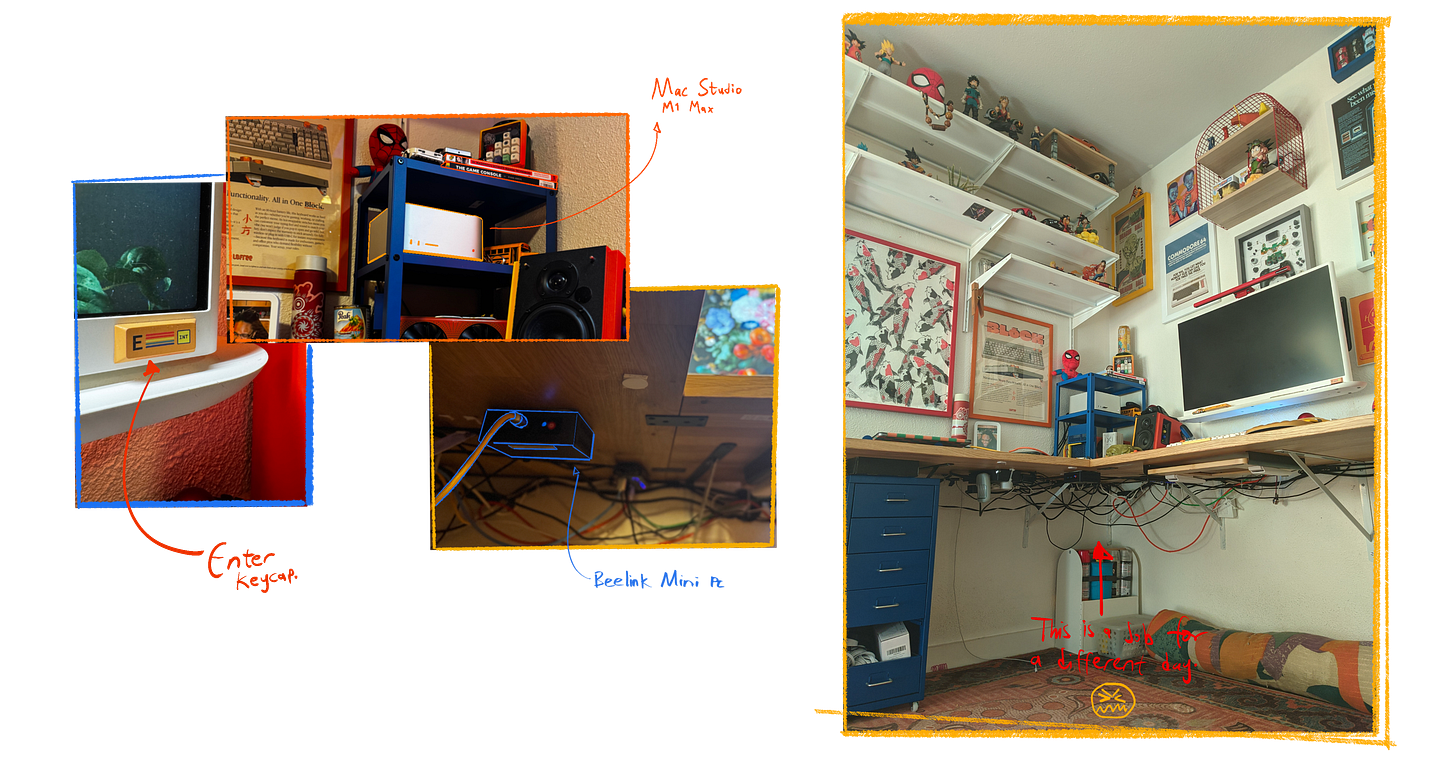
Now to my computer setup. I have a refurbished Mac Studio M1 Ultra that sits on the KNARREVIK nightstand from Ikea along with a decommissioned RX 580 Nitro sitting in a dead GPU enclosure…for aesthetics. When COVID first hit, I was using it to drive an Intel MacBook for gaming—wild times. The Studio powers everything you see, from the monitor to the speakers, even the arc reactor. The monitor, which doubles as a smart TV, is a 4k UHD 32-inch display from LG. Initially, I covered the IR receiver with an Enter keycap because my partner also had an LG TV monitor. When she used the remote, it would, without fail, affect mine. I also have a Beelink Mini PC hooked up that I access via Jump Desktop on my Mac.
Drawing workflow and tools
My wife and I run a small design studio—GeekyPalette. We take on everything from website designs and character concepts to full comic work.
I work primarily on my iPad Pro using Procreate and Clip Studio Paint and on my Mac with Clip Studio Paint paired with a Wacom Intuos Pro. Having the right setup to tackle these tasks smoothly is essential for hitting our targets. I usually drag images and files from my Mac to my iPad via Universal Control. One of the most useful features I use in my workflow.
I love including a macropad when I draw. It not only speeds up the process, but it also makes it fun. My 33-key numpad houses shortcuts for drawing and day-to-day tasks. It sits at my desk, and the 8BitDo comes with me on the go.
Quick shoutout to Paper. I use it for taking notes on client calls and jotting down art ideas. More recently, its been a dumping ground for story ideas/pacing notes and a canvas for fully realizing different projects (spray painting especially). It is not only functional but beautifully designed.
Day-to-Day
My daily routine tends to shift due to the unpredictable nature of freelance work. However, when I do have active projects, the day begins with an overview. Jotting down milestones to hit for the day. I answer calls or emails afterwards. Once the busywork is out of the way, the creative juices start flowing. I work for about 3 hours, take a break, play with my cats, eat lunch, and then work again for about 4-6 more hours. Some days bleed into nights, but we try to strike a balance between meeting our goals and not getting overwhelmed.
Works in progress?
I am currently working on a website redesign for a beef jerky brand and my portfolio website. Along with some personal projects like Paperboy and this blog. Also tech posters, I have some juicy retro ideas cooking up.
Figures, Art, Cars and Books
Anywhere I turn my head in this office, there is at least one Goku figure in my field of view. I love it. It’s one of the first characters I ever drew that made me fall in love with art. There are also lots of prints and artwork. Those are constantly changing, but they tend to be my art, my wife’s art, or an artist’s whose work inspires me. Maybe an inspirational quote or 2.
I create posters that are reminiscent of the tech boom of the 80s and 90s and subsequently the early 2000s. Commodore, Apple, and IBM are all objects of inspiration. If that’s something you’re into, check out my Etsy. 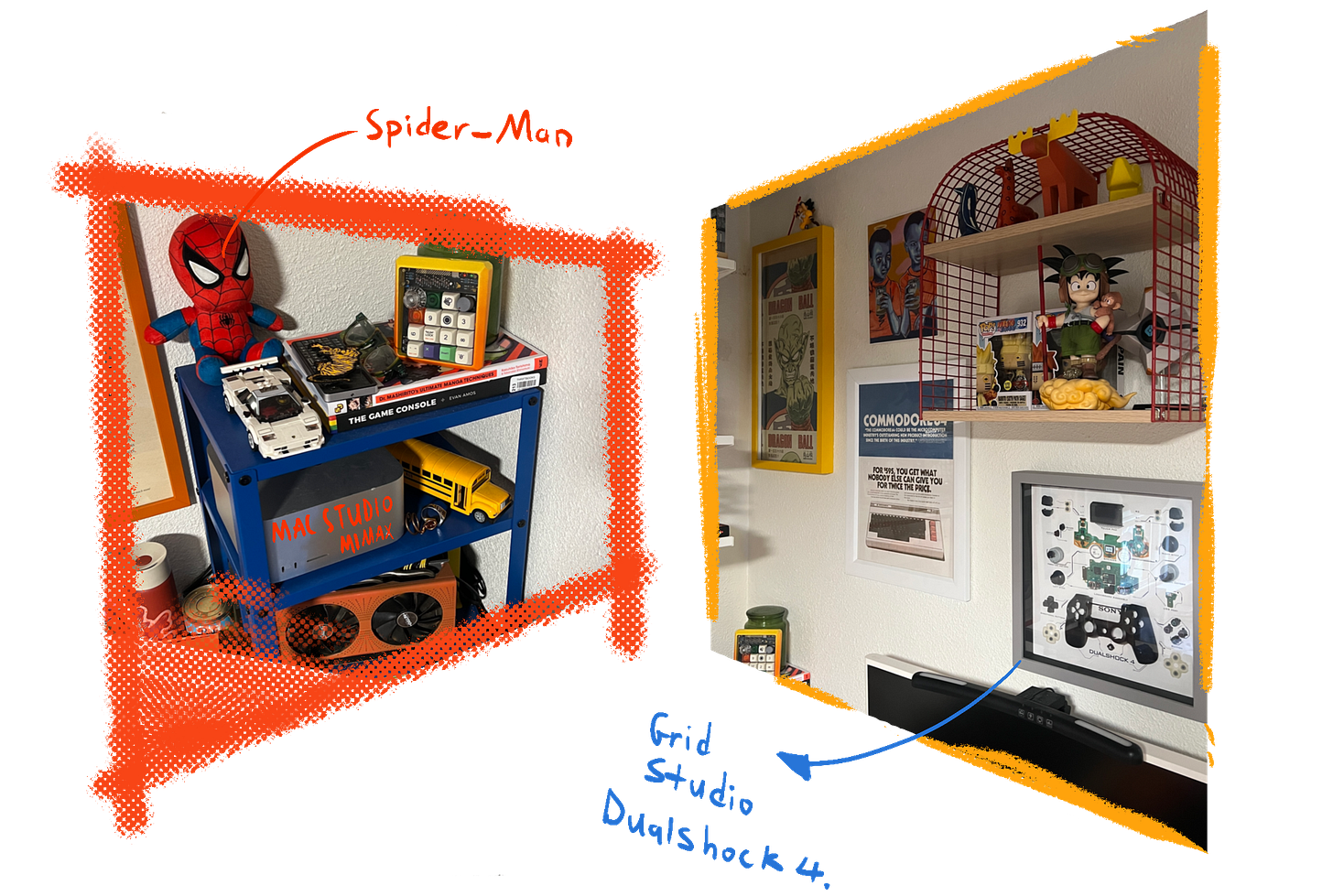
I also love cars. If my wife didn’t stop me, I’d place one in every room. Luckily for her, I exercise restraint. My favorite would be the 1966 Ford GT40 developed with Ken Miles and Carroll Shelby. If you haven’t seen Ford v. Ferrari, I strongly recommend it.
Finally, books. Most of my book collection remains in the living room. The only ones scattered in the office are books I am actively engaging with. That could be for work or leisure. For instance, The Game Console by Evan Amos for the poster work I do, and Dr. Mashirito’s Ultimate Manga Techniques for comics and character design.
Work-From-Home Tips
WFH is a dream. One which many companies have unfortunately rolled back. I don’t have to mention its benefits here.
I’d advise making it a place where you don’t mind sitting in for hours on end. Art is a must. If you’re into that.
Also tools that take the guesswork out of working. We can be as motivated as we want but ultimately we fall to our systems. Create as little friction as possible in your workflow. Also cable manage…something I have elected to do in the future.
Also stretching. It’s easy to forget you haven’t stood up for 3 hours. Set timers. I subscribe to the Pomodoro method. It works wonders for breaking up my routine and keeping me on task. Its easy to get sucked into a rabbit hole. For me its either drawing or fixing something in Shopify.
Finally, take it slow. Rome wasn’t built in one day. The setup I have now is not the setup I had 5 years ago. A curated office is much better than something you rushed through for a post on r/battlestations. Nothing good comes fast, and anything that comes fast will not last. There’s a joke in there somewhere, but I’ll let you make of that what you will.
Final Thoughts
A desk setup seems like a superficial and unnecessary thing to many, but I see it as an extension of myself. I hope you weren’t overwhelmed by the sheer amount of colors and figures. That you for reading and supporting my work. You can also support by grabbing something from the Etsy shop, or commissioning my services. I bid you well!
Thanks for checking out my setup. I’d appreciate it if you shared it with someone who might like it. Otherwise, read on to learn a little more about what we offer on this blog.
The GeekyPalette Blog
At GeekyPalette, we explore 3 facets of my art, writing, drawing and tinkering. We create world’s and explore characters in the Paperboy, I dish out digital art tips at the Drawing Corner and check out cool tech in the Tech Jungle. If that sounds like your thing, do not hesitate to click the button below! Thank you for stopping by.